
Jun 12, 2026
BlogPhishing Incident Response Plan for Small Business (Free Template)
A phishing incident response plan is a written, step-by-step procedure your business follows when a phishing email gets through: report, triage, contain, eradicate, recover, and review. Built on NIST SP 800-61's four-phase lifecycle, it assigns owners, deadlines, and ready-made messages so a small team can act in minutes – no security department required.
What is a phishing incident response plan?
A phishing incident response plan is a short, written playbook that tells everyone in your company exactly what to do the moment someone reports a suspicious email – or admits they clicked one. It names who is in charge, what happens in the first ten minutes, how to contain the damage, and what to tell staff and customers.
You don't have to invent the structure. The U.S. National Institute of Standards and Technology (NIST) built the classic four-phase incident response lifecycle in SP 800-61 (updated to Rev. 3 in April 2025), and CISA publishes phishing-specific guidance. The problem: almost everything written on top of those frameworks assumes a security operations center (SOC). This guide assumes an office manager and maybe one IT person – which is enough, if the plan exists before you need it.
A plan beats panic. Phishing covers credential theft, fake invoices, business email compromise (BEC), and malware delivery – and your first hour usually decides whether it's a non-event or a very bad quarter.
Why does a small business need one?
Because the numbers are not on your side. Business email compromise alone caused more than $2.9 billion in reported losses in 2023 (FBI IC3 Internet Crime Report, 2023), and credential misuse – the thing phishing is designed to achieve – was the top initial access vector in roughly 40% of breaches (Verizon DBIR, 2024). Kaseya's incident response guidance puts it bluntly: an estimated 90% of incidents that end in a data breach start with phishing (Kaseya, 2023).
Here's how it plays out in real life: a clinic's finance clerk receives an invoice that looks exactly like their regular supplier's – same logo, same tone, same payment terms. Only the bank account number changed. Without a plan, "should I pay this?" gets answered by whoever is busiest. With a plan, it gets answered by a checklist. And "we're too small to be a target" is the most expensive assumption a business can make – attackers send 10,000 emails and respond to whoever clicks.
What are the 4 steps of phishing incident response?
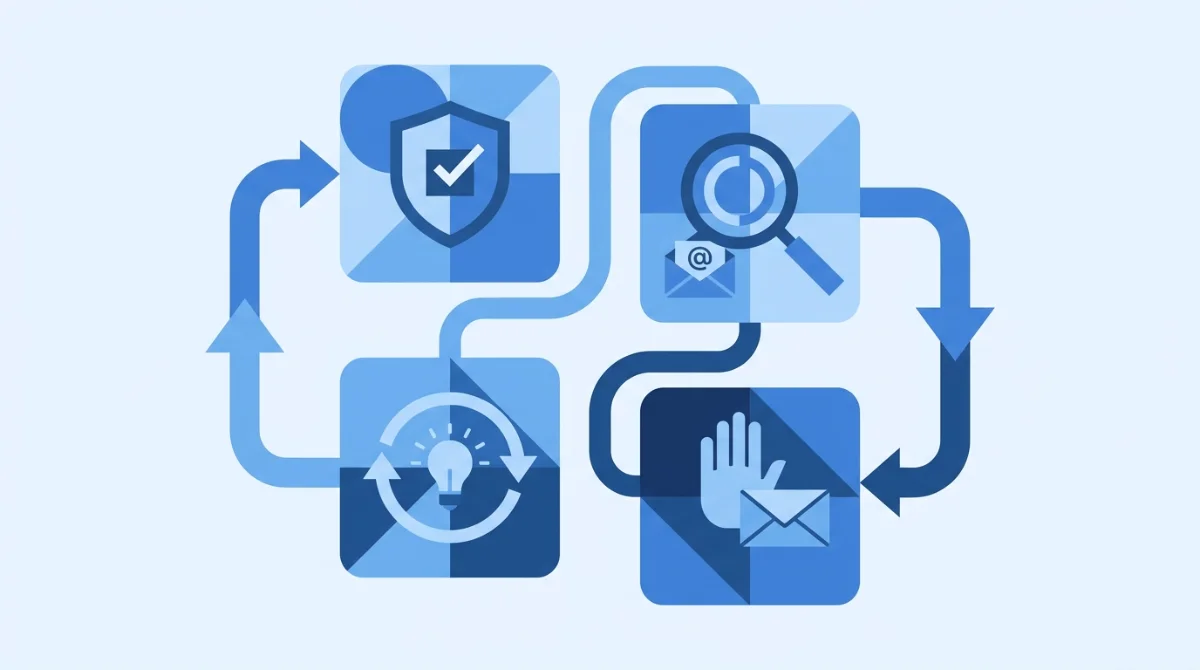
NIST's classic lifecycle has four phases: Preparation; Detection & Analysis; Containment, Eradication & Recovery; and Post-Incident Activity. Here's what each means when your "incident response team" is three people.
1. Preparation (before anyone clicks)
Preparation is 80% of the value. Turn on multi-factor authentication (MFA) everywhere, give staff one obvious way to report a suspicious email (a button or [email protected]), keep a current contact list, and adopt the template below. CISA's phishing guidance calls this stopping the attack cycle at phase one – the cheapest place to win.
2. Detection & analysis (the first 10 minutes)
When a report comes in, answer three questions fast: Did anyone click? Did anyone enter a password or pay anything? Who else got the same email? With no dedicated security staff, use a 10-minute triage rubric for lean teams so the decision doesn't depend on who's at their desk. Speed beats depth here: as Sublime Security's 2026 guidance puts it, "your team's response determines whether it becomes a minor event or a costly breach" (Sublime Security, 2026) – and triage that takes 30–60 minutes manually can be done in minutes with automation.
3. Containment, eradication & recovery
If someone entered credentials: reset that password, sign the account out of all sessions, and check inbox rules (attackers love auto-forwarding). Then watch for the signs of account takeover in the hours that follow. If someone opened an attachment, disconnect that machine from the network and follow a malware incident response checklist. In all cases: delete the email from every inbox, block the sender and any linked domains, and confirm no payment went out.
4. Post-incident review
Within a week, spend 30 minutes on three questions: How long until we noticed? How long until we contained it? What single change would have stopped it? Write the answers into the plan. That's the whole review – no committee required.
The template: your copy-paste phishing response plan
Copy the three blocks below into a document, fill in the names, and you have a working plan today.
Roles & contacts (who does what when there's no SOC)
Role | Who (fill in) | What they do |
|---|---|---|
Incident lead | ______ | Makes the calls: contain, escalate, communicate (owner or IT manager) |
Technical hands | ______ | Resets passwords, purges emails, isolates machines (IT or your MSP/MDR) |
Communications | ______ | Tells staff what to do; drafts customer/regulator notices if data is affected |
Finance check | ______ | Freezes pending payments; verifies bank-detail changes by phone |
The first-hour checklist
When | Action | Owner |
|---|---|---|
0–10 min | Triage: who clicked, what was entered, who else received it | Incident lead |
10–20 min | Reset affected passwords; revoke active sessions; check inbox rules | Technical hands |
20–30 min | Purge the email from all inboxes; block sender, domains, and links | Technical hands |
30–40 min | Freeze related payments; verify supplier bank details by phone | Finance check |
40–60 min | Notify all staff (template below); start an incident log with timestamps | Communications |
What to tell your staff (copy-paste)
"We've identified a phishing email with the subject '[SUBJECT]' sent today. Do not open it, click any links, or reply. If you clicked or entered your password, tell [NAME] now – you will not be in trouble. Reporting fast is what protects us."
That last sentence is the most important line in the whole plan. If people fear blame, they hide clicks – and hidden clicks become breaches.
What should you do in Microsoft 365 or Google Workspace?
Most small businesses run on one of these two, and both include the essential response actions:
- Microsoft 365: use Defender's email search to find and soft-delete every copy of the message, block the sender in the tenant block list, force a password reset and revoke sessions in Entra ID, and check the user's inbox rules for auto-forwarding.
- Google Workspace: use the Admin console's email log search to locate and delete the message from all inboxes, reset the password and sign the user out everywhere, and review mail forwarding settings and filters.
Write down where these buttons are before the incident. Hunting through admin menus at 4:55 PM on a Friday is not a containment strategy.
When should you escalate or get outside help?
Call in professional help when any of these is true: money already left the building, an attacker had mailbox access for an unknown length of time, customer or patient data may be exposed (regulatory notice deadlines can be as short as 72 hours), or the same campaign keeps coming back. Those situations need forensics and around-the-clock monitoring a part-time IT resource can't provide.
That's the gap a managed service closes. ShieldNet Defense runs the detect–triage–contain loop 24/7 – suspicious emails analyzed, compromised accounts flagged, containment in minutes with your approval, not after the weekend.
Frequently asked questions
What is the incident response plan for phishing?
A written procedure covering NIST's four phases applied to phishing: report the email, triage who clicked, reset credentials, purge the message, block the sender, and review what to improve.
What are the 4 P's of phishing?
A common memory aid: attackers pretend to be someone you trust, promise a prize or threaten a problem, apply pressure to act fast, and demand payment in unusual ways (wire, gift cards, crypto). Two or more P's in one email = report it.
What are the 4 steps of incident response?
Per NIST SP 800-61: 1) Preparation, 2) Detection & Analysis, 3) Containment, Eradication & Recovery, 4) Post-Incident Activity. The phases loop – lessons from step 4 feed back into step 1.
What is an example of a phishing incident?
A finance employee gets an email that looks like a regular supplier invoice, but the bank account number has changed – classic BEC. Recovery after a wire transfer is rare, which is why the first-hour payment freeze matters.
How often should a small business test its phishing response plan?
Twice a year: one 30-minute tabletop walkthrough ("an email got clicked – what now?") and one live test – can you actually purge an email, reset a password, and reach everyone on the contact list?
The bottom line
You can't stop every phishing email from arriving, but you can decide – today, on paper – what happens when one gets through. Fill in the roles table, print the first-hour checklist, and tell your team that fast reporting beats silent embarrassment every time. Prefer professionals watching around the clock?
See how ShieldNet Defense handles detection and response for you – the plan runs even while you sleep.
Related Articles

Oct 22, 2026
Real or Fake? HR Asking You to Review Payroll
Got an email from HR asking you to review payroll? Learn how to identify fake payroll emails, verify HR requests, and protect your salary and bank details.
Oct 9, 2026
I replied to a phishing email. Am I at risk?
Replied to a phishing email? Learn what risks you face, what attackers can learn from your reply, and what to do next to protect your account and business.
Oct 8, 2026
Real or Fake? How to verify a sharepoint file invitation
Received a SharePoint file invitation? Learn how to spot fake SharePoint emails, verify shared files safely, and protect your Microsoft 365 account from phishing.

Protect your business with ShieldNet 360
Get started and learn how ShieldNet 360 can support your business.