
Apr 21, 2026
BlogIntroduction to automated incident response for SMEs
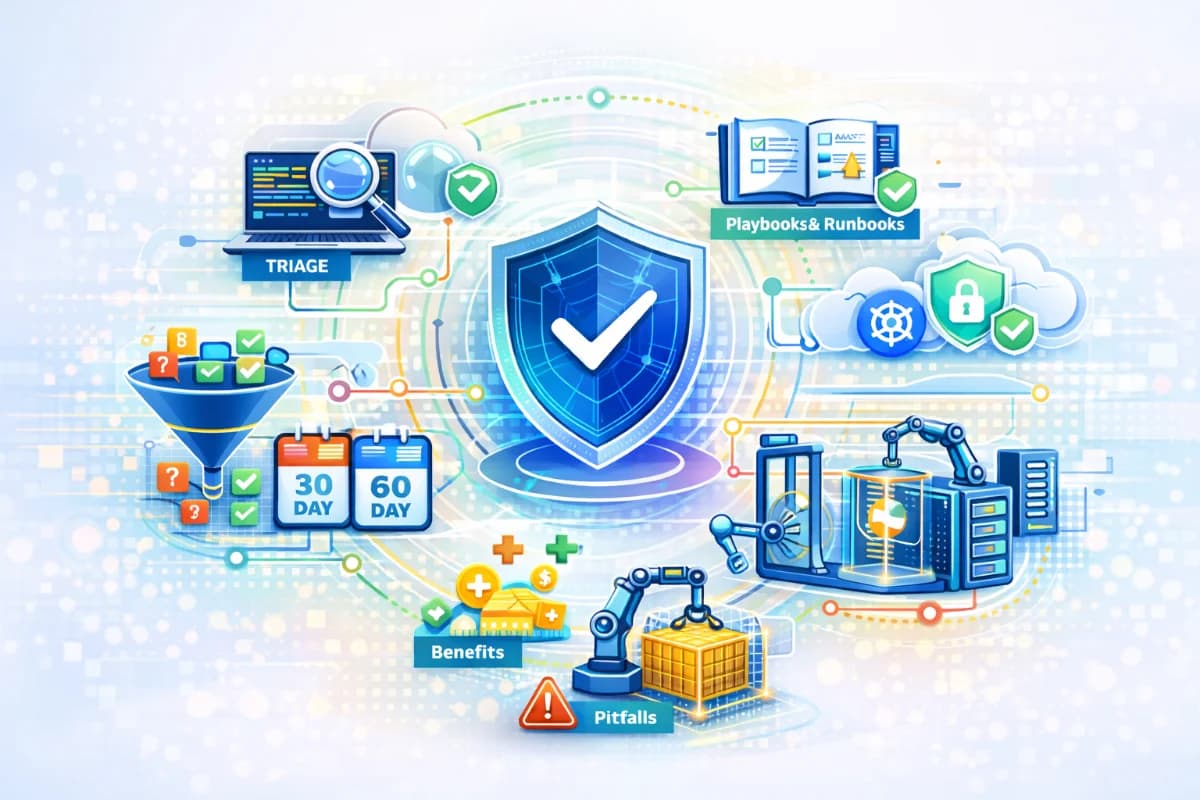
Introduction to automated incident response for SMEs covering alert triage automation, SOAR workflow, playbooks and runbooks, containment automation, benefits, pitfalls, and a 30–60 day rollout.
Automated incident response for SMEs means using simple workflows to turn security alerts into fast, consistent actions, even when you do not have a 24/7 security team. It is not about replacing humans with robots. It is about shrinking the time between an attack signal and the first safe containment step, while collecting evidence and keeping decisions predictable. In practice, it combines alert triage automation to reduce noise, a SOAR workflow to standardize steps, playbooks and runbooks to make actions repeatable, and containment automation to stop incidents from spreading. This beginner-friendly overview explains the terms decision-makers need, the business benefits, the common pitfalls, and what a successful 30–60 day rollout looks like.
Why this topic matters
Most SMEs do not get hurt because they lack security tools. They get hurt because response is late or inconsistent, especially after hours. A compromised email account can create forwarding rules and trigger invoice fraud before anyone sees the alert. A ransomware-like infection can spread across shared drives while the team is asleep. Automated incident response matters because it makes the first 15 minutes reliable: the system groups signals into one incident, collects evidence, and can execute safe containment steps that limit damage.
A realistic operational example is a suspicious login into a finance mailbox. If the team receives three separate alerts in different systems, they may not connect them in time. When triage is automated, those signals become one incident labeled high severity, the incident owner is notified, and a safe action like session revocation can run immediately. For decision-makers, this reduces both financial exposure and operational chaos, because incidents become manageable events rather than surprises.
Key factors and features to consider
What automated incident response means in plain language
Automated incident response is the use of predefined workflows to handle repeatable parts of incident response. Those parts include collecting evidence, grouping related alerts, routing the incident to the right owner, and performing safe containment actions. It does not mean fully automatic shutdown of systems. Good automation is conservative, reversible, and built with approval gates for disruptive actions.
For SMEs, the key is consistency. Automation ensures the same steps happen every time, regardless of who is on call or what time it is. It reduces the need for specialists to interpret raw logs at night. The result is predictable response speed and fewer missed incidents.
Key terms: alert triage automation, SOAR workflow, playbooks and runbooks
Alert triage automation means the system turns multiple raw alerts into a single incident with context and a timeline. It reduces noise and prevents alert fatigue by requiring correlation and confidence thresholds. A SOAR workflow is the standardized path from detection to response: detect, triage, contain, recover, and learn. Playbooks define what to do for a specific incident type and what triggers it. Runbooks define how to do it step by step, including approvals and rollback.
These terms matter because they describe how you control automation. Without triage automation, your team drowns in alerts. Without a SOAR workflow, actions are inconsistent. Without playbooks and runbooks, automation becomes risky because nobody agrees on boundaries. A successful program is mostly process, not tooling.
Containment automation: what can be automated safely
Containment automation is the set of actions that stop an incident from expanding. For SMEs, safe automated actions are typically reversible and narrowly scoped. Examples include revoking suspicious sessions, forcing re-authentication, quarantining a specific email, isolating a single endpoint, and creating a ticket with evidence and timestamps. These steps reduce attacker dwell time while giving humans time to decide bigger moves.
Disruptive actions should be approval-based at first, such as disabling critical accounts, blocking broad domains, isolating servers, or revoking wide vendor access. A time-limited containment pattern is often effective: apply a reversible restriction for a short period, then require approval to extend. This keeps business continuity protected while still improving speed.
Benefits decision-makers should expect
The business benefits are measurable. First, faster containment reduces incident scope, which reduces downtime and recovery effort. Second, better triage reduces alert fatigue and improves staff efficiency because responders focus on a smaller number of meaningful incidents. Third, consistent evidence collection improves customer trust and audit readiness because you can show what happened and what was done. Fourth, always-on behavior reduces after-hours risk without hiring a night shift team.
These benefits should be tracked with a few KPIs. For example, time to detect, time to first containment, and MTTR should improve over 30–60 days if the program is implemented well. Decision-makers should also see fewer after-hours pages and clearer executive summaries. If the program increases pages and confusion, governance and tuning are missing.
Common pitfalls and how to avoid them
A common pitfall is automating disruptive actions too early, causing business disruption and destroying trust. Another pitfall is integrating too many data sources before correlation is ready, which creates alert floods. A third pitfall is lacking clear ownership and escalation rules, so incidents are created but nobody acts. SMEs also fail when playbooks are too complex or not used in real incidents, leading to improvisation under stress.
Avoiding these pitfalls requires phased rollout and governance. Start with a narrow scope, automate triage and evidence first, then automate safe containment actions, and keep disruptive actions behind approvals. Assign an automation owner who tunes monthly and maintains playbooks. This approach keeps the program calm and sustainable.
Detailed comparisons or explanations
What success looks like in 30–60 days
In the first 30 days, success looks like fewer, clearer incidents and better visibility into your top risk areas. You should have minimum integrations in place: identity, email, endpoints, and critical cloud logs. Alerts should be grouped into incidents with a plain-language summary and an evidence timeline. You should also have two playbooks implemented, typically account takeover and ransomware suspicion, with a defined first safe containment action.
By 60 days, success looks like measurable KPI improvement and safe containment automation running reliably. The team should be able to meet an under-20-minute target for first containment on high-severity incidents more often than before. False positives should be decreasing through monthly tuning. Executive summaries should be consistent enough that leadership can make decisions quickly. If you are using an AI-first workflow like ShieldNet Defense, success also includes reduced triage workload and more consistent evidence timelines, because the platform structures incidents for non-specialists.
Minimal stack and operating model for SMEs
Most SMEs do not need a complex SOC platform to start. They need reliable data sources, a place to correlate alerts into incidents, and a simple response workflow. A minimal operating model includes an incident owner rotation, a clear escalation path, and a monthly tuning meeting. The technical stack can be lighter if the workflow is strong, because process determines speed more than tool count.
For SMEs, an AI-first layer can help translate technical telemetry into plain-language incidents and recommend safe actions. ShieldNet Defense can be positioned as supporting this operating model by correlating multi-source signals, reducing noise, and enabling safe containment steps. However, even with AI, you still need clear approvals and playbooks to prevent disruption.
Best practices and recommendations
- Start with two incident types and define a clear under-20-minute first containment goal
- Connect minimum integrations: identity, email, endpoints, and critical cloud logs
- Implement alert triage automation to group alerts into incidents with evidence
- Write two playbooks and runbooks with approvals and rollback steps
- Automate safe containment actions first and keep disruptive actions behind approvals
- Run a 30-day pilot, measure KPIs, then expand scope gradually in the next 30 days
To apply this, treat the first month as a pilot and focus on quality over quantity. If you integrate more sources, require correlation so you do not increase noise. Ensure every incident has a plain-language summary and a minimum evidence package. Run one tabletop exercise in the first month to validate runbooks and escalation rules. In the second month, expand containment automation to cover more high-confidence patterns and add one additional playbook, such as invoice fraud attempts or data exposure through sharing.
FAQ
Do SMEs really need automated incident response?
Many SMEs benefit because after-hours risk is real and staffing is limited. Automated incident response reduces reliance on manual triage and makes the first response loop happen consistently. It does not require a full SOC team to start. With a narrow scope and safe automation, SMEs can reduce incident impact quickly.
What should we automate first?
Automate evidence collection and alert triage automation first, because they reduce effort without causing disruption. Then automate safe containment actions like session revocation and email quarantine. Keep disruptive actions behind approvals until false positives are low. This staged approach builds trust and avoids outages.
How do playbooks and runbooks help decision-makers?
They reduce uncertainty during incidents. Playbooks define what actions are taken and when, while runbooks define how actions are executed and who approves. This prevents ad hoc decisions that increase business risk. It also makes executive communication clearer and faster.
How do we measure whether the rollout is successful?
Track a small set of KPIs: time to detect, time to first containment, MTTR, false positive rate, and after-hours pages. Compare baseline performance to 30-day and 60-day results. Success should look like faster containment, fewer noisy pages, and clearer incident summaries. If the trend is opposite, tuning and governance are missing.
Where does ShieldNet Defense fit in an SME rollout?
ShieldNet Defense can fit as an AI-first layer that correlates alerts into plain-language incidents, captures evidence timelines, and triggers safe containment actions with guardrails. It helps reduce triage workload and improves consistency for lean teams. It should still be deployed with phased automation and approval gates. Evaluate it on the same KPIs used for the rollout.
Conclusion
Automated incident response for SMEs is a practical way to achieve always-on response behavior without building a full SOC. By combining alert triage automation, a SOAR workflow, playbooks and runbooks, and safe containment automation, SMEs can reduce incident scope and improve response speed. The key is phased rollout: start small, validate signals, automate evidence and triage first, then enable safe actions and expand over 30–60 days. With clear ownership and monthly tuning, the program stays calm rather than chaotic.
Related Articles

Oct 9, 2026
I replied to a phishing email. Am I at risk?
Replied to a phishing email? Learn what risks you face, what attackers can learn from your reply, and what to do next to protect your account and business.
Oct 8, 2026
Real or Fake? How to verify a sharepoint file invitation
Received a SharePoint file invitation? Learn how to spot fake SharePoint emails, verify shared files safely, and protect your Microsoft 365 account from phishing.

Oct 1, 2026
I paid a fake invoice. What should my business do?
Paid a fake invoice? Learn what your business should do immediately to contact the bank, preserve evidence, secure accounts, investigate the fraud, and reduce further losses.
