
Jun 12, 2026
BlogDeep Packet Inspection, Explained Simply: How Modern Firewalls See Hidden Threats

Deep packet inspection (DPI) is a firewall technique that examines the actual content of network traffic – not just the address labels – so it can spot malware, data theft, and risky apps hiding inside normal-looking connections. It's the core capability that separates a next-generation firewall (NGFW) from the basic one built into your office router.
Think of your network traffic as mail. A basic firewall is a mail clerk who only reads envelopes: where it's from, where it's going. Deep packet inspection opens the envelope and reads the letter. That difference sounds small until you realize attackers figured out long ago that the envelope always looks fine – the threat is inside. Here's how DPI works, what it catches, and what it means when you're choosing a firewall for a business without a security team.
What is deep packet inspection?
Deep packet inspection is a method of examining the full content of data packets – the small chunks every email, download, and video call is broken into as it crosses your network. Each packet has two parts: a header (the envelope: sender address, destination, port) and a payload (the letter: the actual data). Ordinary packet filtering reads only the header. DPI reads both.
Because it sees the payload, a DPI-capable firewall can answer questions a basic one can't: Is this download carrying malware? Is this "normal web traffic" actually a file-sharing app? Is customer data quietly leaving the building? That's why DPI sits at the heart of every next-generation firewall.
How is DPI different from a basic firewall check?
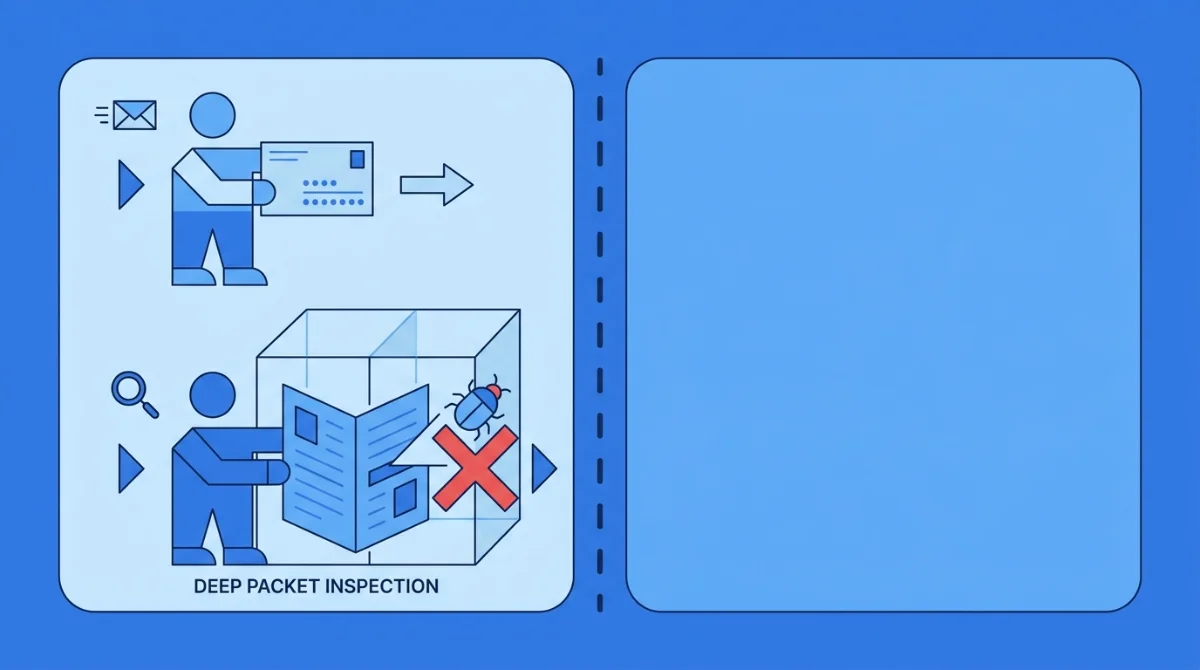
The firewall built into a typical office router does stateful packet filtering: it checks headers against simple rules – this address is allowed, that port is blocked – and tracks which connections were opened from inside. That was fine when threats announced themselves with suspicious addresses. They don't anymore.
Basic packet filtering | Deep packet inspection | |
|---|---|---|
What it reads | Header only (addresses, ports) | Header + payload (the actual content) |
Can it spot malware in a download? | No | Yes |
Can it tell apps apart on the same port? | No – web is web | Yes – Zoom vs. YouTube vs. file-sharing |
Can it catch data leaving the network? | Only by destination | By destination and content |
Where you get it | Any router | Next-generation firewalls |
One practical consequence for an office: because DPI can tell which application traffic belongs to, it also powers bandwidth control – prioritize the video call with a client, slow down the lunchtime streaming. Same technology, two payoffs: security and speed.
A real-world flavor of that: a tutoring center we know of spent months blaming their ISP for "slow internet" during afternoon classes. The router's basic firewall saw nothing wrong – every packet had a valid address. A DPI-capable firewall saw the actual story in about an hour: three staff laptops streaming video through the same connection the lesson software depended on. Two bandwidth rules later, the "ISP problem" was gone. Envelope-readers can't solve that; letter-readers can.
How does deep packet inspection work?
Modern DPI engines combine three approaches. Translated from vendor-speak:
1. Signature matching – the mug-shot list
The firewall compares packet contents against a constantly updated database of known threats – malware files, attack patterns, malicious domains. Gigamon's network-visibility team describes it well: "It's a bit like airport security identifying prohibited items in luggage using an X-ray scanner. If they see an object that matches the shape or signature of a prohibited item, they inspect it further." Fast and accurate for known threats; blind to brand-new ones.
2. Anomaly detection – out-of-character behavior
The firewall learns what normal looks like on your network – typical traffic volumes, usual destinations, regular working patterns – then flags significant deviations. A sudden surge of data leaving at 2am, or a printer that starts talking to a server in another country, gets caught even though no signature matched. (If you want to go deeper on reading those signals, we've covered network traffic analysis fundamentals separately.)
3. Policy rules – the default-deny door
You (or sensible pre-built templates) define what's allowed – approved app categories, business hours, content rules – and the firewall blocks what doesn't fit. This is what enforces "no torrenting on the office Wi-Fi" without anyone playing network police manually.
What threats does DPI actually catch?
The ones that matter to a small business, mostly because they're the ones dressed as normal traffic:
- Malware in everyday downloads – an invoice attachment or "software update" carrying ransomware gets stopped at the network edge, before it reaches the laptop of whoever clicked it.
- Data exfiltration – DPI inspects outbound traffic too, so customer lists or financial records being smuggled out trigger a block, not a headline.
- Risky and rogue applications – file-sharing tools, unapproved remote-access software, and bandwidth hogs that all look like "just web traffic" to a basic firewall.
- Phishing payloads – the malicious file behind the convincing link, caught on delivery.
The stakes aren't theoretical: stolen credentials featured as the top initial attack vector in roughly 40% of breaches (Verizon DBIR, 2024), and IBM's Cost of a Data Breach research put the global average breach cost at $4.88 million in 2024. Small businesses don't pay average – they pay survival.
Can DPI see inside encrypted (HTTPS) traffic?
Here's the question most explainers dodge: the padlock. Most web traffic today is encrypted with TLS/HTTPS, which means even a DPI engine can't read the payload by default – the letter is in a sealed, coded envelope.
The honest answer: modern firewalls handle this with TLS inspection (also called HTTPS or SSL inspection). The firewall briefly decrypts traffic, inspects it, and re-encrypts it before passing it along – like a customs checkpoint authorized to open sealed packages. Without TLS inspection enabled, a "deep" firewall is mostly reading envelopes again; with it, you get real visibility at some cost in processing overhead. Even when inspection isn't enabled, DPI still extracts useful signals from encrypted traffic – destinations, certificate details, traffic patterns – which anomaly detection puts to work.
When evaluating a firewall, ask specifically: does it inspect encrypted traffic, and can it do so without grinding the office internet to a halt? Hardware that was sized for envelope-checking often buckles when asked to decrypt and inspect everything – which is one reason cloud-managed firewalls, where heavy inspection runs on infrastructure built for it, have become the practical choice for smaller offices.
Is deep packet inspection a privacy problem?
It can be – ask Reddit, where DPI threads turn into privacy debates fast. The same capability that reads malware payloads can read messages. Three rules keep it legitimate in a workplace:
- Inspect the company network, for security. DPI should hunt threats and policy violations – not monitor individuals' private lives.
- Tell people. An acceptable-use policy that says work traffic on the office network is security-screened is both fair and, in many places, legally expected.
- Prefer category-level controls. "Block malware and gambling sites" needs no human reading anyone's traffic – good DPI runs as an automated bouncer, not a surveillance desk.
Used this way, DPI is closer to the smoke detector than the security camera: it watches for danger, not for people.
What does DPI mean when you're choosing a firewall?
If your "firewall" is whatever came inside the ISP router, you have envelope-checking only. For an office with 10–250 connected devices – laptops, phones, tablets, POS, guest Wi-Fi – that gap is exactly where modern threats live.
What to look for, in plain terms:
- DPI with intrusion prevention – finds and blocks threats in traffic content, inbound and outbound.
- Encrypted-traffic inspection – because the padlock is where threats hide now.
- Application awareness and bandwidth control – security and a faster office in one box.
- Cloud-managed, with plain-language alerts – pre-built policies and alerts a non-expert can act on, because most growing businesses don't have a firewall engineer (and shouldn't need one).
That last point is our honest opinion after watching SMEs shop for firewalls: the spec sheet matters less than whether anyone in your office can actually run the thing. A firewall nobody understands is a very expensive paperweight with blinking lights.
FAQ
What are the different types of deep packet inspection?
DPI engines use three main techniques: signature matching (comparing content against a database of known threats), anomaly or heuristic detection (flagging behavior that deviates from your network's normal patterns), and policy-based rules (default-deny filtering that only allows approved traffic types).
What are the benefits of deep packet inspection?
Better threat detection (malware and data theft hidden in normal-looking traffic), application-level visibility and control, bandwidth prioritization for business-critical apps, content policy enforcement, and evidence for compliance – all from one inspection point at the network edge.
What are the ethical considerations of deep packet inspection?
DPI can read traffic content, so workplace use should be limited to security and policy enforcement, disclosed to staff in an acceptable-use policy, and configured for automated category-level blocking rather than reading individuals' communications.
Which firewalls can perform deep packet inspection?
Next-generation firewalls (NGFWs). Basic router firewalls and traditional stateful firewalls inspect only packet headers; an NGFW adds DPI, intrusion prevention, application control, and – critically – inspection of encrypted traffic.
See what your firewall has been missing
Deep packet inspection is the difference between checking envelopes and reading the room. ShieldNet Gateway brings NGFW-grade deep packet inspection to businesses without a security team: cloud-managed, pre-configured policies, encrypted-traffic visibility, and alerts written in plain English. Modern protection for every device on your network – no firewall engineer required.
Related Articles

Oct 22, 2026
Real or Fake? HR Asking You to Review Payroll
Got an email from HR asking you to review payroll? Learn how to identify fake payroll emails, verify HR requests, and protect your salary and bank details.

Oct 9, 2026
I replied to a phishing email. Am I at risk?
Replied to a phishing email? Learn what risks you face, what attackers can learn from your reply, and what to do next to protect your account and business.
Oct 8, 2026
Real or Fake? How to verify a sharepoint file invitation
Received a SharePoint file invitation? Learn how to spot fake SharePoint emails, verify shared files safely, and protect your Microsoft 365 account from phishing.

Protect your business with ShieldNet 360
Get started and learn how ShieldNet 360 can support your business.