
Feb 27, 2026
BlogSMEs security checklist: essential controls for 2026
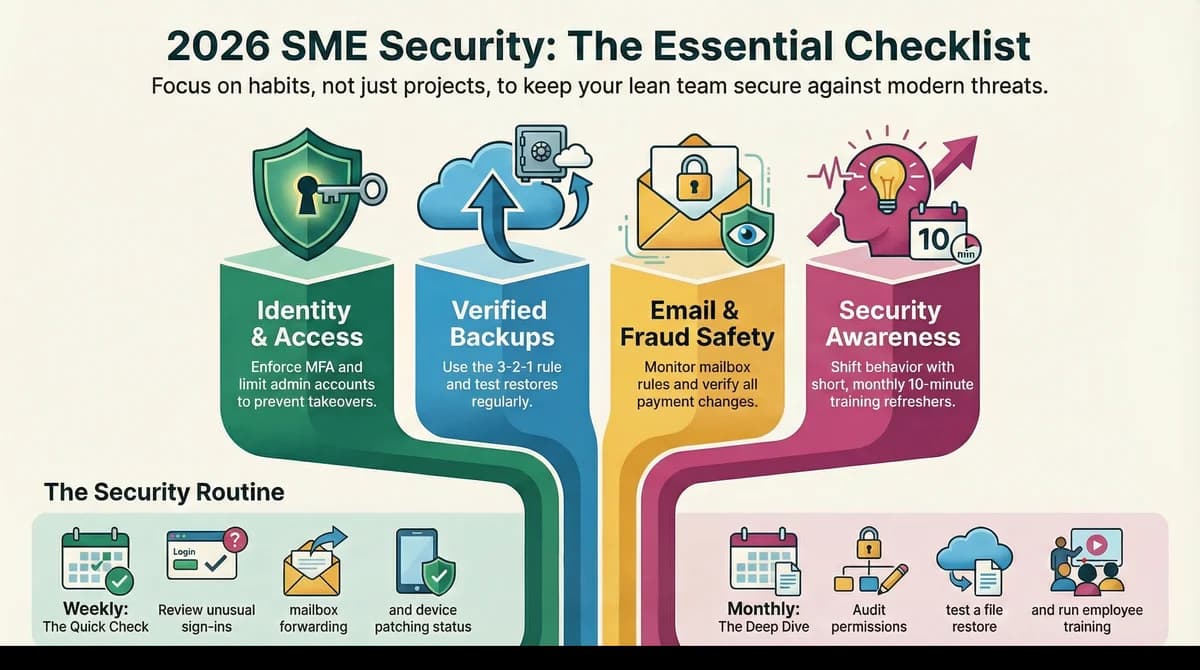
A practical SMEs security checklist is not a long compliance document; it is a short list of controls and routines that reduce real risk without slowing down the business. Most small companies are attacked through common paths: weak passwords, reused accounts, phishing, exposed services, and missing backups. If your team is lean, you need basic security controls that are easy to operate every week, not just policies that look good once per year. The article will share an essential checklist, explain why each item matters, and show how to implement access management, backups, and security awareness training as habits, not one-time projects.
Why this topic matters
SMEs are targeted because attackers assume security basics are inconsistent and response is slow after hours. The cost of a breach for a small business is often operational: blocked access to systems, delayed deliveries, stalled invoicing, and loss of customer trust. An essential SMEs security checklist matters because it turns security into a repeatable operating model: what to set up, what to review, and what to practice. When basics are in place, even sophisticated attacks have fewer easy entry points.
A realistic scenario is a 60-person company with shared cloud drives and a finance mailbox used for vendor payments. One employee clicks a phishing link, a password is reused, and the attacker logs in from a new location at night, then creates a forwarding rule and starts requesting payment changes. Without access management and security awareness training, the pattern is missed until money is at risk. With basic security controls, the login is blocked or flagged, the mailbox rule change is detected, and the team has a routine to verify payment instructions. The checklist is not just prevention; it is how you reduce the impact window.
Key factors and features to consider
Prioritize high-impact controls over long lists
A strong SMEs security checklist focuses on controls that reduce the most common risks first: identity protection, patching, backups, and secure configurations. SMEs should avoid spreading effort across dozens of minor items that are hard to maintain. A practical rule is to prioritize controls that prevent account takeover, stop ransomware impact, and reduce data exposure. When the list is short, execution quality improves.
Make basic security controls measurable and repeatable
Controls only work if they are maintained, so define simple checks and owners. For example, “all admin accounts must use strong login verification” is measurable if you can list admins and confirm the setting weekly. “Backups exist” is measurable if you can restore a file from last week within a set time. SMEs benefit when controls are defined as routines rather than one-time setups, because risk returns when settings drift.
Access management as the foundation of SME security
Access management is how you control who can sign in, what they can access, and how quickly you can revoke access when something looks wrong. For SMEs, the highest leverage is enabling multi-step login verification, reducing admin accounts, and using role-based permissions for sensitive folders and finance workflows. A practical example is enforcing stronger login verification for finance and executive mailboxes, because those accounts are often targeted for payment fraud. When access management is disciplined, many incidents stop early.
Backups that are actually usable under pressure
Backups are only valuable if you can restore quickly and confidently. SMEs should focus on “3-2-1 thinking” in simple terms: keep multiple copies, store one copy separate from daily systems, and regularly test restores. A realistic expectation is to test a small restore monthly and a larger restore quarterly, because ransomware and accidental deletions are common. If you cannot restore within a time window that matches your business operations, your backup plan is incomplete.
Security awareness training that changes behavior
Security awareness training should be short, regular, and focused on the most common scams your employees see, especially phishing and payment redirection. SMEs often succeed with monthly 10-minute refreshers and clear reporting channels, rather than annual training that employees forget. Use real examples like “verify bank account changes via a second channel” and “do not approve unexpected login prompts.” Training is effective when it changes daily habits and reduces risky clicks.
Detailed comparisons or explanations
Checklist-driven security versus “security projects”
SMEs often treat security as a project – buy a tool, write a policy, run a training – then move on. Checklist-driven security treats it as operations: set up controls once, then run small routines weekly and monthly to keep them working. This approach is more realistic for SMEs because staffing is limited and priorities change quickly. A checklist also creates accountability because it assigns owners and makes review cadence visible.
A mini case: preventing account takeover and invoice fraud
Invoice fraud often starts with compromised email accounts and weak access management. A practical SMEs security checklist reduces risk by requiring strong login verification, monitoring mailbox rule changes, and enforcing a “payment change verification” routine. Even if a user clicks a phishing link, the attacker’s access is more likely to be blocked or detected, and payment changes are less likely to be approved without verification. This is how basic security controls deliver business outcomes: fewer financial losses and fewer emergency investigations.
Balancing simplicity and coverage in 2026
In 2026 planning, SMEs should assume they will run more cloud services, more remote access, and more vendor integrations, which increases the number of identities and permissions to manage. That makes access management and monitoring routines more important than adding niche tools. The right balance is a small set of strong controls plus consistent review cadence, then incremental expansion as the business grows. When you maintain the basics, you avoid the trap of “more tools, same risk.”
Best practices and recommendations
- Identity and access management: enable multi-step login verification, reduce admin accounts, and review permissions monthly
- Device and patch hygiene: keep operating systems and browsers updated, and remove unsupported software quickly
- Email safety: enable anti-phishing protections, monitor mailbox forwarding rules, and require payment-change verification
- Backups: maintain separate copies, protect backup access, and test restores on a schedule
- Security awareness training: run short monthly refreshers and define a clear “report suspicious” process
- Incident readiness: write a one-page incident response plan with owners, escalation, and first-hour steps
- Vendor and data basics: restrict third-party access, review shared links, and limit sensitive data exposure
To apply this checklist, start with identity and backups because they reduce the biggest business risks: account takeover and ransomware impact. Then implement email-specific routines, because payment fraud is a common SME attack path. Finally, make training short and frequent so behavior changes, and add incident readiness so you can respond calmly when something slips through. The key is to turn each bullet into a weekly or monthly routine with a named owner, so the checklist remains “alive.”
A simple weekly and monthly routine for lean teams
Weekly, review unusual sign-ins, check for mailbox forwarding rule changes, and confirm patching is on track for critical devices. Monthly, review admin accounts and sensitive folder permissions, test a small backup restore, and run a short security awareness training refresher. Quarterly, run a larger restore test and a short incident tabletop drill using your one-page plan. These routines keep basic security controls effective without creating heavy operational overhead.
Common mistakes SMEs should avoid
A common mistake is focusing on tools while ignoring access management, which leaves accounts vulnerable even with good products. Another mistake is having backups that are not protected or never tested, which fails when ransomware hits. SMEs also often run training too infrequently or without practical examples, so employees do not change behavior. Avoid these mistakes by keeping the checklist short, measurable, and tied to routine reviews.
FAQ
What is the fastest way to improve SME cybersecurity checklist coverage?
The fastest way is to secure identities first: enable multi-step login verification and reduce admin accounts, then ensure backups are working and tested. These two moves reduce the most common high-impact incidents for SMEs. After that, add email routines and simple training to reduce phishing-driven account compromise.
How much time should an SME spend on basic security controls each week?
Many SMEs can maintain a strong baseline with a small weekly routine, such as 30–60 minutes for reviews plus any patching follow-ups. The time depends on your systems and headcount, but the goal is consistency rather than intensity. Short weekly habits are more effective than occasional large efforts that people abandon.
What access management settings matter most for small businesses?
The most important access management settings are strong login verification, minimal admin privileges, and role-based access to sensitive data and finance workflows. Also ensure you can quickly remove access when employees leave or vendors no longer need it. These settings reduce account takeover and limit damage if a user is compromised.
How should SMEs test backups without disrupting operations?
Start with small restores, such as restoring a single file or folder, and time how long it takes from request to recovery. Do this monthly and record the results, then run a larger restore quarterly to validate your process under more realistic pressure. This testing ensures backups are usable and helps you improve recovery time without causing downtime.
What should security awareness training cover in 2026?
Security awareness training should focus on phishing, password reuse, unexpected login prompts, and payment redirection scams. It should also teach employees how to report suspicious activity quickly and what to do if they think they clicked something risky. Short monthly refreshers using real examples are more effective than annual sessions, especially for SMEs.
Conclusion
A strong SMEs security checklist is built around high-impact basics: access management, backups, email safety, and security awareness training supported by simple operational routines. When you keep the list short and measurable, basic security controls remain effective even with a lean team. Start with identity and backups, then add email routines and incident readiness so your business can respond quickly and consistently. If you want a practical next step, assign owners to each checklist area and schedule weekly and monthly reviews so this checklist becomes a living part of operations, not a one-time document.
Related Articles

Apr 17, 2026
How to automate incident response safely step by step
How to automated incident response with a SOAR workflow, containment automation, playbooks and runbooks, and response orchestration using a safe phased rollout.

Apr 17, 2026
Managing automated incident response without alert chaos
Managing automated incident response with false positive reduction, playbooks and runbooks, response orchestration, and MTTD and MTTR governance for SMEs.
Apr 14, 2026
Checklist: Automated security monitoring for lean teams
Checklist automated security monitoring for lean teams with always-on security, security monitoring service options, alert triage automation, and playbooks and runbooks.

Protect your business with ShieldNet 360
Get started and learn how ShieldNet 360 can support your business.