
May 4, 2026
BlogAI threat detection demo: detect, analyze, respond
What is an AI threat detection demo?
An AI threat detection demo is a practical walkthrough of how modern cybersecurity systems detect and stop threats in real time.
Instead of focusing on technical complexity, a good demo answers one simple question:
“If something goes wrong, how fast can we detect it, understand it, and stop it?”
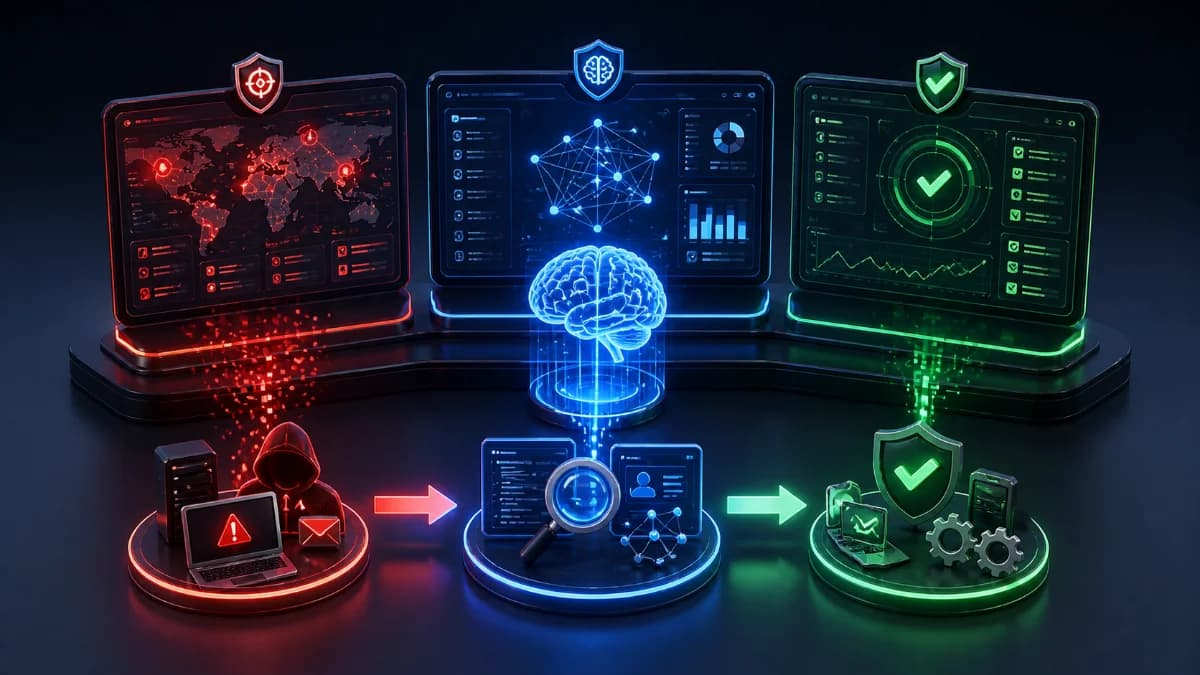
This is why most modern cybersecurity demos follow a clear workflow:
👉 Detect → Analyze → Respond
This approach helps businesses move from raw alerts to clear decisions and actions.
Why SMEs need a simple detection workflow
Many small and medium-sized businesses already use tools that generate alerts.
But in reality:
- Alerts are too many
- Signals are unclear
- Teams don’t know what to do next
This leads to:
- Slow response
- Missed incidents
- Higher business risk
An AI-driven threat detection demo shows how to solve this by:
- Reducing noise
- Grouping signals into incidents
- Automating analysis and response
Demo scenario: how a real attack begins
To understand the workflow, let’s look at a simple example often used in a threat detection demo.
Situation:
- An employee logs into a cloud application
- Minutes later, the same account logs in from another country
- A new device is detected
- Email settings are modified silently
There is no warning message.
Everything looks like normal usage.
But this is the start of a potential account takeover attack.
Step 1: Detect – identifying abnormal behavior
The first step is detection.
In the demo dashboard, the system continuously monitors:
- Login patterns
- Device activity
- Geographic location
- Access behavior
What triggers detection?
Examples include:
- Impossible travel (two locations within minutes)
- New or unknown devices
- Unusual login times
- Risky IP addresses
When detected:
👉 The system creates a high-risk alert
👉 Related signals are grouped into a single incident
Instead of seeing many alerts, users see:
- One clear problem
- One clear starting point
Step 2: Analyze – turning signals into understanding
Detection is only useful if you understand what happened.
This is where AI-driven analysis becomes critical.
What happens during analysis?
The system automatically:
- Collects all related activities
- Correlates events across systems
- Identifies suspicious patterns
What the dashboard shows
Instead of raw logs, you see:
- A structured timeline
- Step-by-step attack progression
- Key actions taken by the attacker
For example:
- Login from a new country
- Access to mailbox
- Creation of forwarding rule
- Abnormal data access
👉 This turns technical data into a clear story
Step 3: Respond – stopping the threat fast
Once the system confirms risk, response actions are triggered.
In a detect analyze respond model, response must be:
- Fast
- Consistent
- Safe
Typical automated actions
- Revoke active sessions
- Block suspicious access
- Prevent further data exposure
Guided recovery actions
The system also suggests next steps:
- Reset credentials
- Enforce multi-factor authentication (MFA)
- Remove persistence mechanisms (email rules, risky apps)
👉 The goal is not just to stop the attack, but to fully recover safely
What makes a good cybersecurity demo?
A strong AI threat detection demo is not about showing more data.
It is about showing better clarity.
Key dashboard outputs
A well-designed dashboard should include:
- Incident overview
- Risk level classification
- Timeline of events
- Affected users and systems
- Automated actions taken
- Recommended next steps
Everything should be:
- Visual
- Structured
- Easy to understand
Even for non-technical users.
How AI improves detection and response
Traditional systems rely on manual investigation.
AI changes this by:
- Detecting patterns faster
- Connecting events automatically
- Reducing investigation time
- Triggering response immediately
For SMEs, this means:
- No need for a large security team
- Faster decision-making
- Less operational burden
Business impact for SMEs
An effective AI threat detection demo highlights real business outcomes:
- Faster threat detection (minutes instead of hours)
- Reduced alert fatigue
- Lower risk of data loss
- Faster incident containment
- Better operational efficiency
👉 Stronger protection with less effort
Common questions
What is a threat detection demo?
A threat detection demo shows how a system identifies suspicious activity, analyzes incidents, and responds to threats in real time.
What does detect analyze respond mean?
It is a workflow where:
- Detect = identify suspicious behavior
- Analyze = understand what happened
- Respond = take action to stop the threat
Why is AI important in threat detection?
AI helps automate detection and analysis, making it faster and more accurate than manual processes.
Do SMEs need a cybersecurity demo?
Yes. A demo helps SMEs understand how threats are handled and how quickly they can respond without needing deep technical knowledge.
Key takeaway
A modern AI threat detection demo should be simple to understand but powerful in action.
With a clear Detect → Analyze → Respond workflow, businesses can:
- Detect threats earlier
- Understand incidents faster
- Respond within minutes
👉 That is the difference between stopping an attack and discovering it too late.
Related Articles
May 5, 2026
ShieldNet Defense: AI-powered threat detection for SMEs
Discover ShieldNet Defense, an AI-powered threat detection platform that explains risks in plain language and helps SMEs detect, analyze, and respond to threats faster.
Apr 28, 2026
Incident triage for lean teams: prioritize what matters fast
Incident triage for lean teams using severity scoring, incident prioritization, and an incident queue to decide next actions in 10 minutes with clear summaries.

Apr 27, 2026
How to Prevent Insider Threats with Smarter Access Controls
Learn how to prevent insider threats with identity-based access controls, continuous verification, and least-privilege strategies built for SMEs.

Protect your business with ShieldNet 360
Get started and learn how ShieldNet 360 can support your business.