
Apr 7, 2026
BlogAutomated threat response: what it is and how to use it in 2026
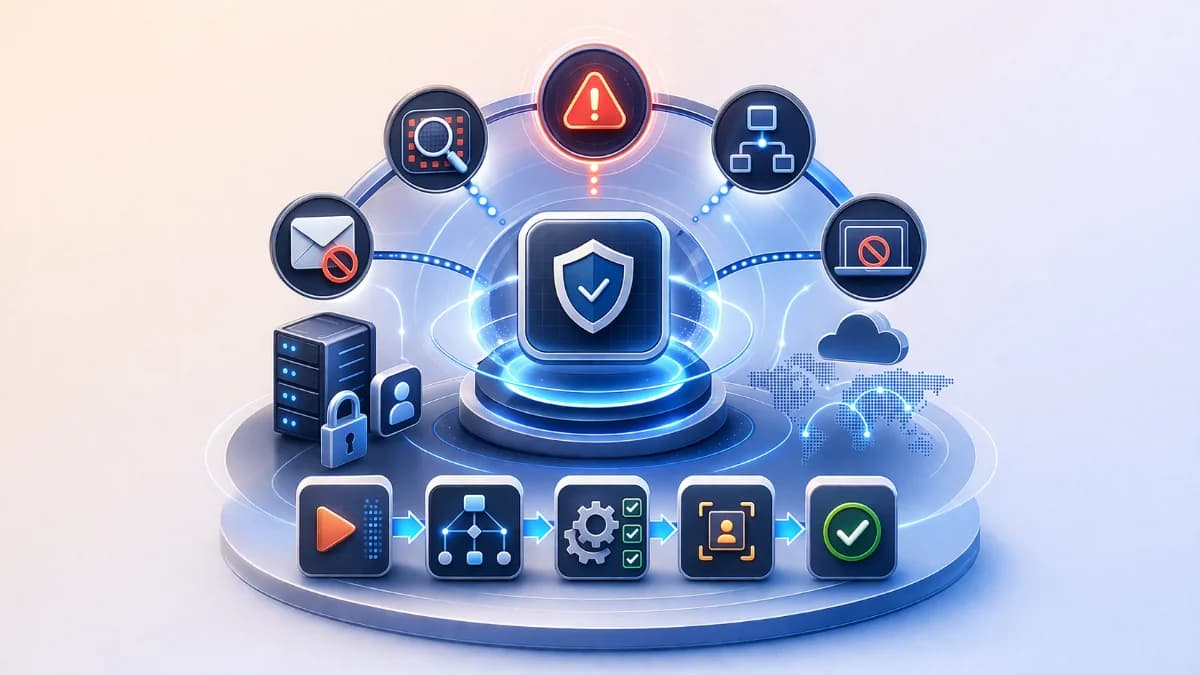
Automated threat response explained: response orchestration, containment automation, playbooks and runbooks, and a SOAR workflow with guardrails to contain, isolate, and revoke access safely.
Automated threat response is the practice of using workflows to execute repeatable containment actions like revoking sessions, quarantining emails, or isolating a device so incidents stop getting worse while humans are still assembling context. For SMEs, it’s less about fully automatic security and more about speed with safety: shrinking attacker dwell time without breaking critical operations. The best programs combine response orchestration, playbooks and runbooks, and a SOAR workflow that starts with safe, reversible steps and expands over time. This article explains what automated threat response is, which outcomes it should deliver (contain, isolate, revoke access), and how to roll it out in phases with guardrails to avoid disruption.
Why this topic matters
Most SME incidents escalate because of delay, not because nobody cares. A suspicious login becomes account takeover, then becomes data theft or invoice fraud while alerts wait in inboxes. A single infected device can spread ransomware like behavior across shared folders in minutes if it isn’t isolated. Automated threat response matters because it turns your first 15 minutes into action, not discussion. When containment begins quickly, the scope shrinks, downtime reduces, and MTTR improves naturally.
A realistic scenario is a weekend email compromise on a finance account. Without automation, the team may not see the incident until Monday, by which time forwarding rules and downstream password resets have already happened. With containment automation, the system can revoke suspicious sessions, force re authentication, and flag payment change emails for review within minutes. The business impact is not theoretical: fewer fraudulent transfers, fewer exposed documents, and less leadership chaos. This is why automated response is a practical lever for SMEs that cannot staff night shifts.
Key factors and features to consider
Automated threat response: What it is and what it is not
Automated threat response is the use of predefined workflows to execute response actions consistently when certain conditions are met. It is not random auto blocking, and it is not a replacement for incident owners. In a good program, automation handles the repetitive steps collect evidence, correlate signals, execute safe containment while humans handle judgment and disruptive decisions. SMEs should treat automation as a force multiplier that reduces time to first containment.
A useful definition is: automation executes the first safe move, then hands the incident to a human with evidence. This keeps speed high without eliminating oversight. It also makes response more consistent across different people and different shifts. When combined with clear playbooks and runbooks, it reduces panic decision making during incidents.
Response orchestration: Connecting tools into one incident workflow
Response orchestration means integrating identity, email, endpoint, and cloud controls so actions can be executed from a single incident workflow. Without orchestration, SMEs waste time jumping between dashboards and manually repeating steps. With orchestration, an incident can automatically trigger evidence collection, severity tagging, and a set of response actions. The result is faster and more reliable containment.
For example, an account takeover incident may require actions across multiple systems: revoke sessions in identity, disable mailbox forwarding rules in email, and check unusual file sharing in cloud storage. Orchestration ensures those steps happen in a predictable sequence and are recorded. This is the core of a SOAR workflow: turning detection into standardized response.
Containment automation outcomes: Contain, isolate, revoke access
Containment automation should focus on outcomes that stop the incident from expanding. The three most common outcomes are: contain the blast radius, isolate a compromised endpoint, and revoke access for suspicious sessions or accounts. In practice, that includes actions like session revocation, forced re authentication, email quarantine, device isolation, and temporary access restriction for risky accounts. SMEs should prioritize actions that are reversible and low disruption.
Containment is about limiting spread, not solving everything. The first automated goal is to prevent further damage while investigation continues. If you can stop a compromised account from continuing to act, you buy time for human review. This is how automated response improves MTTD/MTTR outcomes indirectly: faster containment reduces scope, which reduces recovery time.
Playbooks and runbooks: Making response repeatable
Playbooks and runbooks are what make automation safe. A playbook defines the incident type, triggers, severity rules, and required actions. A runbook defines step by step procedures and approvals, including what evidence to gather and what decisions need leadership input. SMEs often have informal tribal knowledge that disappears under stress; formal playbooks turn that into repeatable action.
A good runbook includes stop conditions, such as do not isolate a server that hosts billing without approval, and always verify business impact before blocking a domain. It also defines who is on point and what the update cadence is. When runbooks are clear, automation can execute safely because humans have already agreed on boundaries.
SOAR workflow: Phased automation with guardrails
A SOAR workflow is a structured way to automate detection to response. For SMEs, the most sustainable approach is phased automation. Phase 1 automates evidence collection and incident grouping. Phase 2 automates low risk containment actions. Phase 3 automates higher impact actions with approvals and time limited controls. Guardrails include approval gates, allowlists, role based access, and rollback steps.
Phased rollout prevents the most common automation failure: disruptive false positives. If you start with aggressive auto blocking, one mistake can break business operations and destroy trust in the program. If you start with safe automation and build confidence using KPIs and reviews, automation becomes a trusted part of operations. This is how lean teams adopt automated threat response without disruption.
Detailed comparisons or explanations
Automated response vs manual response: The real difference is latency and consistency
Manual response often fails because the first responder must collect context, open multiple tools, and decide actions under uncertainty. That introduces latency and inconsistency, especially after hours. Automated threat response reduces latency by executing predefined safe actions immediately and collecting evidence automatically. It also increases consistency because every incident follows the same baseline workflow.
A practical comparison is account takeover containment. In manual response, someone might spend 20 40 minutes confirming whether the login is real, searching for related events, and deciding whether to revoke access. With automation, the system can revoke suspicious sessions immediately, force re authentication, and attach evidence for review. Even if the incident later turns out benign, the action is reversible and the security gain outweighs the disruption. This is how a guardrailed SOAR workflow improves response speed.
What to automate first: Safe actions that reduce risk without breaking operations
SMEs should automate actions that are reversible, targeted, and low impact. Examples include collecting logs, creating an incident ticket with evidence, quarantining a specific email, revoking a session, forcing re authentication, and temporarily limiting access to a single account. These actions reduce attacker dwell time without shutting down core systems.
By contrast, high impact actions like isolating critical servers, disabling core user accounts, or blocking broad domains should require approval until you have strong confidence and low false positive rates. SMEs should also implement time limited automation, such as restrict access for 30 minutes unless extended, to avoid long disruptions. This approach builds trust and prevents automation from becoming a business risk.
How ShieldNet Defense can fit into automated threat response?
Automated threat response requires two things: clear incidents and reliable execution paths. ShieldNet Defense can be positioned as the layer that converts signals into plain language incidents, assigns severity, and triggers safe response steps with evidence. For SMEs, that reduces the need for specialist interpretation and helps the incident owner act quickly. It also supports executive reporting by maintaining a consistent timeline and action log.
The key is guardrails. ShieldNet Defense should be configured to start with safe actions and approval based escalation for disruptive steps. Over time, as confidence and baselines improve, the automation scope can expand. This is consistent with the phased SOAR workflow model described above. The goal is operational speed and calm, not uncontrolled automation.
Best practices and recommendations
- Define your top incident types and write playbooks that map triggers to safe containment outcomes
- Start with response orchestration for identity, email, endpoints, and key cloud apps
- Implement phased automation: evidence first, then low risk containment, then approved high impact actions
- Use guardrails: allowlists, approval gates, rollback steps, and time limited restrictions
- Measure KPIs: time to first containment, false positives, and business disruption incidents
- Review monthly and tune playbooks based on real outcomes and near misses
To implement this, choose two incident types that cause the most damage for SMEs: account takeover and ransomware suspicion. Create playbooks that define what signals trigger action and what the first safe action is. Configure orchestration to automatically collect evidence and execute that first action when confidence is high. Put all disruptive actions behind approvals, and document rollback procedures. If you use ShieldNet Defense, configure it to produce plain language incident summaries and to trigger safe containment automation, then review the results monthly to expand scope safely.
- Safe actions to automate first: session revocation, forced re authentication, email quarantine, incident ticket creation with evidence
- Approval gated actions: endpoint isolation for critical devices, disabling privileged accounts, blocking broad domains, vendor access revocation across many systems
- Evidence package to standardize: timeline, affected accounts, affected devices, actions taken, and remediation tasks
These lists keep automated threat response practical. Safe actions deliver immediate risk reduction with minimal disruption. Approval gated actions protect business continuity until confidence is proven. Standardized evidence packages improve investigation speed and support compliance and customer trust. Over time, the program becomes more reliable because every incident teaches you how to tune the next run.
FAQ
What is the difference between a playbook and a runbook?
A playbook defines the what and when: incident type, triggers, severity, and the set of actions to take. A runbook defines the how: step by step execution, approvals, rollback steps, and who is responsible. SMEs need both because automation requires clarity about boundaries and procedures. When runbooks are missing, teams improvise under stress and automation becomes risky.
Can automated threat response cause business disruption?
Yes, if it is implemented without guardrails or if false positives are high. That is why phased automation and approval gates are essential. Start with low risk, reversible actions and measure disruption incidents. Over time, as baselines improve and confidence increases, you can expand automation safely. The goal is fewer disruptions overall by preventing major incidents, not zero automation risk.
What are safe containment actions for SMEs to automate first?
Safe actions are targeted and reversible, such as revoking suspicious sessions, forcing re authentication, quarantining a specific email, collecting evidence, and opening a ticket with context. These actions reduce attacker dwell time without shutting down systems. SMEs should avoid broad blocks and account disabling early, because false positives can halt operations. Safe automation is the fastest way to improve response speed without needing analysts.
How do we measure whether response orchestration is working?
Measure time to first containment, incident response consistency, and false positive rates. Also track how often incidents require manual evidence gathering, because orchestration should reduce that work. SMEs can set an under 20 minute goal for high severity incidents and measure whether automation achieves it. If containment happens faster and with fewer errors, orchestration is working.
How does a SOAR workflow help SMEs specifically?
A SOAR workflow gives SMEs a standardized way to connect tools and execute response steps quickly. It reduces the need for specialized knowledge because workflows are predefined and evidence is collected automatically. It also improves after hours coverage because the first response loop can run even when humans are offline. For SMEs, the biggest benefit is predictable speed with guardrails.
Conclusion
Automated threat response is the use of response orchestration and SOAR workflow automation to deliver fast containment outcomes contain, isolate, revoke access without waiting for manual investigation. SMEs should implement it in phases with guardrails: start with evidence collection and low risk containment automation, then expand to higher impact actions behind approvals. When done correctly, automated response reduces attacker dwell time, lowers downtime impact, and improves MTTR by shrinking incident scope early. If you want a practical next step, write two playbooks, automate the safest first actions, and consider using ShieldNet Defense to generate plain language incidents and trigger safe response steps with consistent evidence.
Related Articles
Oct 1, 2026
I paid a fake invoice. What should my business do?
Paid a fake invoice? Learn what your business should do immediately to contact the bank, preserve evidence, secure accounts, investigate the fraud, and reduce further losses.
Sep 29, 2026
I clicked a phishing link. What should I do now?
Sent confidential information to a fake email? Learn what to do immediately, how to report the incident, assess exposed data, and reduce further risk.

Sep 25, 2026
I clicked a phishing link. What should I do now?
Clicked a phishing link? Learn what to do immediately, whether you entered a password or downloaded a file, and how to reduce the risk to your account and business.

Protect your business with ShieldNet 360
Get started and learn how ShieldNet 360 can support your business.