
Apr 22, 2026
BlogAutomated incident response for SMEs: when it is safe to use
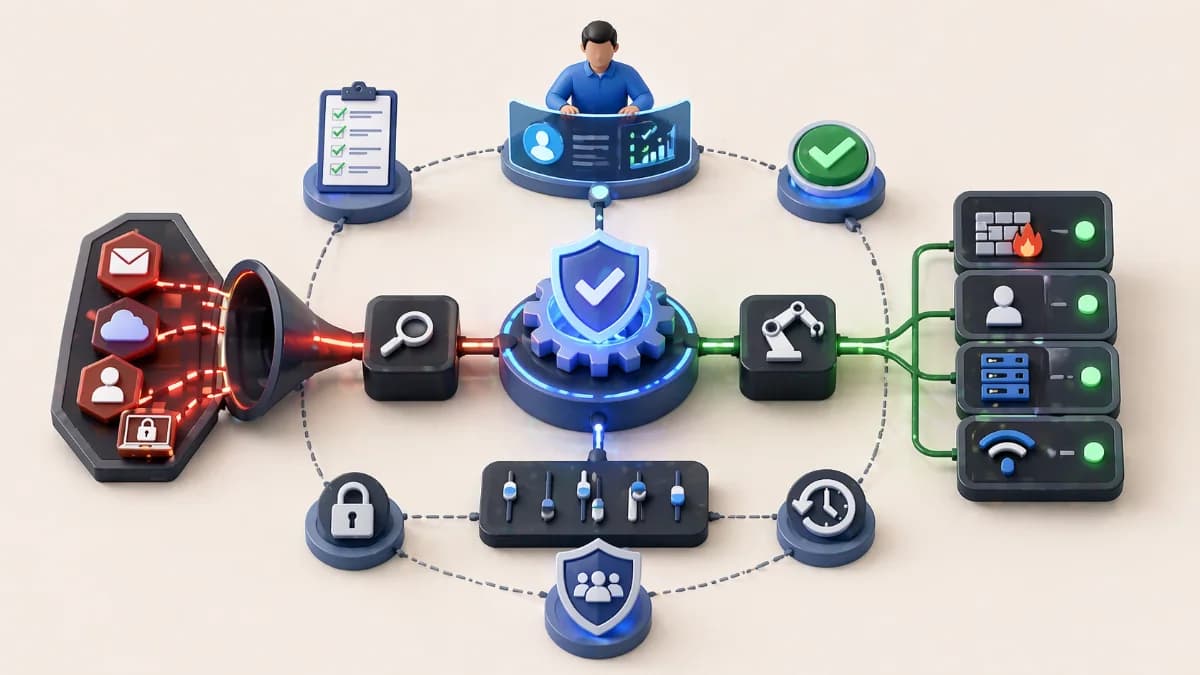
Automated incident response helps SMEs contain incidents faster, but only when automation is scoped, reversible, and approval-gated. Learn what to auto-contain safely.
Automated incident response can be a major advantage for lean teams, but only if you treat automation as a safety system, not a shortcut. In practice, automated incident response for SMEs works best when it performs fast, low-risk containment and evidence capture, then hands off decisions that could disrupt operations. This article explains what actions are safe to run automatically, what requires approval, and how to align response automation to a one-click resolve mindset without creating downtime. You will also see how SOAR for small business workflows connect tools, reduce alert fatigue, and enable automated remediation that stays controlled and predictable.
Why this topic matters
SMEs often lose the most outside business hours, when suspicious activity turns into real impact before anyone reacts. A compromised email account can create forwarding rules, trigger invoice fraud attempts, and download sensitive files in a short window. Automated incident response matters because it shortens the first 15 minutes from confusion to containment, which is when most damage either stops or accelerates.
The risk is that automation can cause business disruption if it acts on low-confidence signals. A single suspicious login could be a legitimate travel event, but an auto-disable action would block a critical user and undermine trust. The goal is not maximum automation, it is predictable response automation that contains true incidents quickly while avoiding false positive harm.
Key factors and features to consider
Safe automation means reversible actions with a small blast radius
The safest automated incident response actions are those you can undo quickly and that affect only the suspected identity or device. Session revocation, forced re-authentication, quarantining a specific email, and isolating one endpoint are examples of containment steps that limit attacker dwell time without shutting down core systems. These actions align well with a one-click resolve concept because they are targeted and measurable.
Safe actions should also produce evidence automatically, not just execute a change. Evidence includes what triggered the action, which account or asset was affected, what was done, and when it happened. When evidence is consistent, leadership trusts the workflow and your team learns faster from each incident.
Approval-gated automation protects business continuity
Some actions can materially disrupt operations, so they should require approval, at least until your false positive reduction is proven stable. Disabling privileged accounts, blocking broad domains, isolating servers, or revoking wide vendor access can stop attacks, but they can also stop the business. Approval gates keep automated remediation from turning into self-inflicted downtime.
To keep approvals from slowing response, use a time-limited containment pattern. Apply a reversible restriction for a short window, notify the incident owner, then require approval to extend or escalate. This approach is how SMEs stay fast while still controlling risk, especially in after-hours situations.
Signal quality and confidence determine what you can trust
Automated incident response is only safe when the signals are reliable and correlated. A single alert is rarely enough to justify action, but a chain of supporting signals can be high confidence. For example, a new device login plus mailbox rule creation plus unusual downloads within minutes is a stronger indicator than any one event alone. Correlation is the engine of false positive reduction and it is what enables safe one-click response.
A practical requirement is that high-severity automation should be triggered by at least two independent sources, such as identity plus email, or endpoint plus cloud audit logs. This reduces the chance that a benign anomaly triggers containment. It also makes response decisions easier for non-specialists because the incident story is clearer.
SOAR for small business connects tools into predictable workflows
SOAR for small business is best understood as a standardized workflow that links detect, triage, contain, and document. It is not a giant enterprise platform requirement, it is a repeatable process that your lean team can operate. The value is consistency, because the same incident type triggers the same evidence capture and the same safe actions. That consistency reduces variance between responders and keeps response automation calm.
A strong SOAR workflow also defines ownership and escalation, which prevents incidents from sitting unhandled. When responsibilities are explicit, automated incident response becomes a routine rather than a scramble. This is where an AI-first workflow like ShieldNet Defense can help by turning multi-source alerts into plain-language incidents and triggering safe actions with evidence and guardrails.
Automated remediation should focus on stabilization, not perfection
Automated remediation is often misunderstood as fully fixing an incident. In SMEs, automated remediation should first stabilize the situation, prevent spread, and preserve evidence. Full remediation often requires human judgment, business context, and coordinated recovery steps such as restoring systems, rotating credentials, and validating integrity. If you try to automate everything early, you increase the risk of disruption and incomplete fixes.
A safer approach is staged remediation. Start with stabilization actions that are reversible and scoped, then use playbooks and runbooks for deeper fixes. Over time, as false positives fall and workflows mature, you can expand the automation scope in small steps. This is how you keep response predictable while still increasing speed.
Detailed comparisons or explanations
One-click resolve is a policy decision, not a button
One-click resolve only works when you define what resolve means. For SMEs, resolve should often mean contained and safe, not fully fixed. A one-click action might revoke sessions, force re-authentication, quarantine a malicious email, and open a ticket with evidence. It should not automatically delete data, reconfigure production networks, or disable critical accounts without approval.
A useful model is to define three tiers of actions. Tier one is safe and automatic, tier two is time-limited containment pending review, and tier three is approval-required disruptive change. This structure makes automated incident response usable for decision-makers because it is predictable and aligned to business risk.
Example workflow: account takeover containment without chaos
An account takeover workflow can show how response automation works in practice. Detection starts with identity and email signals, then correlation groups them into one incident. Alert triage automation labels severity based on account role, such as finance or admin, and attaches evidence like login history and mailbox rule changes. Containment automation then revokes suspicious sessions and forces re-authentication.
If additional signals appear, such as mass downloads or vendor payment changes, the workflow escalates to approval for stronger actions, like temporarily disabling access to sensitive systems. The key is that the first safe actions happen quickly, while higher-risk steps are controlled. This balance is what keeps SMEs fast without creating alert chaos.
How ShieldNet Defense can fit into the model
ShieldNet Defense can be positioned as an AI-first layer that turns alerts into decision-ready incidents. It can group related signals, summarize what happened in plain language, attach an evidence timeline, and trigger safe containment actions with guardrails. For SMEs, this reduces the cognitive load on the incident owner, especially after hours, and makes one-click resolve patterns more realistic.
The governance still matters. You should configure which actions are safe to run automatically, which require approval, and which require time-limited containment first. When the platform produces consistent evidence and action logs, it also supports KPI tracking, which is essential for improving MTTD and MTTR without increasing disruption.
Best practices and recommendations
- Start with two incident types: account takeover and ransomware suspicion
- Validate signal quality and correlation before automating containment
- Define safe actions and approval-gated actions in writing
- Implement one-click resolve as a contained state, not a full fix
- Use playbooks and runbooks with rollback steps and stop conditions
- Track KPIs monthly: MTTD, time to first containment, MTTR, and false positives
These steps work best as a 30 to 60 day rollout. In the first month, focus on alert triage automation, incident grouping, and evidence standardization, then enable one or two safe containment automations. In the second month, expand response orchestration carefully and add one more playbook, while keeping disruptive actions behind approvals until false positive reduction is stable.
- Safe actions to automate first
- Create an incident ticket with evidence and timestamps
- Revoke suspicious sessions for high-confidence identity incidents
- Force re-authentication for the affected account when appropriate
- Quarantine a specific malicious email or attachment
- Isolate a single endpoint showing ransomware-like behavior
This list is intentionally conservative because it targets the smallest possible blast radius. Each action can be reversed, scoped, and verified quickly, which protects business continuity. When these actions run consistently, your team gains speed without fear, and automated remediation becomes more trustworthy over time.
- Actions that should require approval
- Disable privileged or business-critical accounts
- Block broad domains or large network ranges
- Isolate servers that support billing or production workloads
- Revoke wide vendor access across many systems
- Perform mass credential rotation that could disrupt integrations
Approval requirements do not mean slow response if you use time-limited containment. They mean controlled decision-making for changes that could create downtime or break workflows. This is the governance layer that keeps automated incident response sustainable for SMEs.
FAQ
When is automation safe in automated incident response?
Automation is safe when actions are reversible, scoped, and triggered by high-confidence correlated signals rather than single alerts. Safe automation should also generate evidence automatically so humans can review what happened and why the action ran. SMEs should start with containment steps that do not shut down critical systems. As false positives fall, automation scope can expand cautiously.
What can be auto-contained without approval?
Auto-contained actions typically include revoking suspicious sessions, forcing re-authentication, quarantining a specific email, and isolating one endpoint. These actions reduce attacker dwell time and have a limited blast radius. They also align well with response automation because they can run quickly at night. Broad blocks and account disablement should usually be approval-gated.
What requires approval and why?
Actions that can disrupt operations require approval, such as disabling privileged accounts, blocking broad domains, isolating servers, or revoking wide vendor access. The reason is that false positives can cause downtime and business loss. SMEs should use time-limited containment as a bridge, applying a reversible restriction briefly while waiting for approval. This keeps you fast without taking uncontrolled risk.
How does SOAR for small business help make automation predictable?
SOAR for small business standardizes the workflow from detection to triage to containment and documentation. It ensures the same incident type triggers the same evidence capture and the same safe actions, which reduces variance and alert fatigue. It also defines ownership and escalation so incidents do not stall. For SMEs, predictability is more valuable than complexity.
How should we align automation to one-click resolve?
Define one-click resolve as reaching a contained and safe state, not as fully fixing everything automatically. One click can revoke sessions, quarantine malicious email, isolate one endpoint, and open a case with evidence. Full remediation still requires runbooks, business context, and approval for disruptive changes. This alignment makes automation useful without creating chaos.
Conclusion
Automated incident response for SMEs is safest when it is staged, evidence-driven, and governed by clear approval rules. Use response automation for reversible, scoped containment and reserve disruptive actions for approval, ideally with time-limited containment to stay fast. Build a SOAR for small business workflow that groups alerts into incidents, reduces noise, and standardizes playbooks and runbooks. When you treat automation as a predictable operating system, one-click resolve becomes realistic as a containment step, and automated remediation can expand over time without disruption. A platform like ShieldNet Defense can support this by producing plain-language incidents, consistent evidence, and guardrailed safe actions that help lean teams respond quickly and calmly.
Related Articles

Oct 9, 2026
I replied to a phishing email. Am I at risk?
Replied to a phishing email? Learn what risks you face, what attackers can learn from your reply, and what to do next to protect your account and business.
Oct 8, 2026
Real or Fake? How to verify a sharepoint file invitation
Received a SharePoint file invitation? Learn how to spot fake SharePoint emails, verify shared files safely, and protect your Microsoft 365 account from phishing.

Oct 1, 2026
I paid a fake invoice. What should my business do?
Paid a fake invoice? Learn what your business should do immediately to contact the bank, preserve evidence, secure accounts, investigate the fraud, and reduce further losses.
