
Apr 10, 2026
BlogEarly Warning Signals: How to Detect and Contain Ransomware Fast
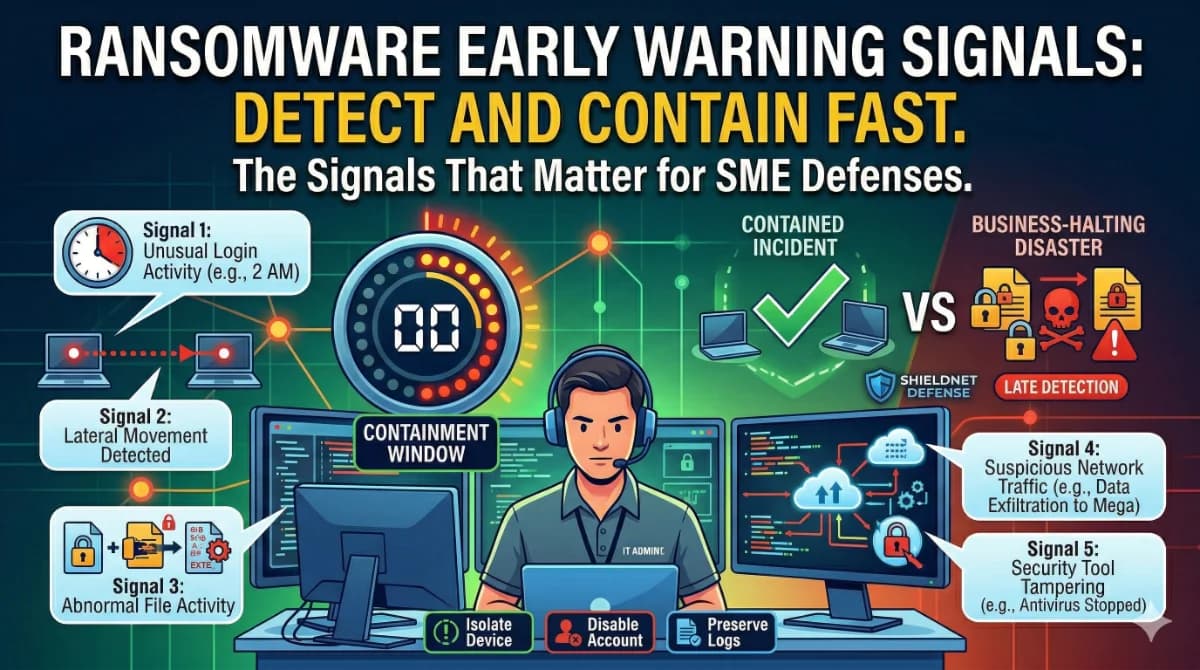
Your network isn't locked yet – but the clock may already be running.
Most ransomware attacks don't announce themselves. Instead, they leave quiet signals: strange file behavior, unusual logins, unexplained CPU spikes. Recognizing these early warning signs – lateral movement, suspicious encryption activity, abnormal outbound traffic – is the difference between a contained incident and a business-halting disaster. This guide explains exactly what to watch for and how to act fast.
If you run a small or medium-sized business without a dedicated security team, this guide is built for you. No jargon, no vendor whitepaper – just the signals that matter, what they mean, and what to do when you see them.
Why Ransomware Detection Timing Changes Everything
Most business owners picture ransomware as an instant event: you click something, everything locks. The reality is far slower – and that's actually good news for defenders who know what to look for.
According to the Sophos 2025 Active Adversary Report, the median dwell time for ransomware cases dropped to just 4 days. That means attackers are typically inside your network for roughly four days before deploying their payload. This dwell time creates a detection window. If you spot attackers during reconnaissance or lateral movement, you can stop them before encryption.
The stakes for missing that window are severe. The median time from initial intrusion to ransomware execution dropped to 5 days in 2025, reflecting attackers' push to deploy faster and limit detection. And for SMEs specifically: 75% of small to medium-sized enterprises admit the likelihood of closure should cybercriminals extort them, and 60% of small businesses shut down within six months post-attack.
Understanding the attack stages clarifies what signals to expect and when.
The four stages ransomware typically moves through:
- Initial Access – A phishing email, stolen VPN credential, or unpatched vulnerability gets the attacker inside
- Lateral Movement – The attacker quietly explores, mapping your network and escalating privileges
- Pre-Encryption Activity – Backup systems are disabled, data is exfiltrated, persistence mechanisms are established
- Encryption & Ransom Demand – Files are locked and a ransom note appears
Once encryption begins, detection is essential to limit lateral movement and further data impact. At this stage, detection enables SOC teams to contain the blast radius, protect adjacent systems, and start recovery workflows. But if you catch it in stages 1 or 2, you can stop the attack entirely.
What Are the Most Important Early Warning Signals?
These are the indicators that fire before your files get encrypted. Each signal maps to a specific attack phase. If you see more than one in a short timeframe, treat it as a crisis.
Signal 1: Unusual Login Activity and Credential Anomalies
Compromised credentials are the primary ransomware entry point. According to IBM's 2025 Cost of a Data Breach Report, credential-based breaches take 246 days on average to identify and contain. That delay costs businesses dearly – catching stolen credentials early is one of the highest-value detection opportunities you have.
Watch for:
- Logins at 2–4 AM from employee accounts that normally log in during business hours
- Multiple failed login attempts followed by a successful login (brute-force pattern)
- A single account authenticating from two different geographic locations within hours
- New admin accounts created by existing admin accounts without a change management ticket
- Logins to systems that the user has no business reason to access (e.g., a marketing employee accessing the server room share)
Suspicious access to credentials history is a technique often used during the credential access phase, where ransomware attempts to gather authentication data to escalate privileges, disable security tools, or facilitate lateral movement.
Signal 2: Lateral Movement – The Quiet Spread
Lateral movement is the phase where attackers move from their initial foothold to more valuable systems. Lateral movement remains a key phase in nearly every attack, as adversaries move deeper into compromised environments following initial access.
Watch for:
- A workstation suddenly initiating connections to other workstations or servers it doesn't normally communicate with
- Rapid SMB (file-sharing) sessions being created between devices – especially from a device that isn't a server
- PowerShell commands running from unexpected sources (e.g., a machine that typically only runs office applications)
- PsExec or Windows Management Instrumentation (WMI) being used to execute processes on remote systems
- Internal port scanning – a device pinging dozens of internal IPs in quick succession
Once an attacker obtains user or service account privileges, they can bypass many signature-based detection tools. MITRE ATT&CK references like T1021.001 for RDP exploitation confirm how common it is to move laterally simply by reusing stolen logins.
Signal 3: Abnormal File System Activity
This is where the pre-encryption phase becomes visible in the file system – often hours before the ransom note appears.
Watch for:
- Rapid, high-volume file renames or modifications affecting dozens or hundreds of files in minutes
- Files suddenly gaining unfamiliar extensions (e.g.,
.locked,.enc, random character strings appended to filenames) - Mass access to network shares by a single user or process
- Shadow copy deletion – the command
vssadmin delete shadowsappearing in logs is a critical red flag
Indicators of imminent encryption include high-velocity file modifications across network shares, abnormally high CPU and disk I/O usage, unexpected changes to volume shadow copies, and blocked access to backup agents.
Signal 4: Suspicious Network Traffic
Ransomware operators routinely exfiltrate your data before encrypting it – a tactic called double extortion. 87% of ransomware attacks in 2025 involved data exfiltration, meaning attackers steal copies of your data first. This exfiltration creates a network signature you can detect.
Watch for:
- Large outbound data transfers, especially to unfamiliar cloud storage services (Mega, anonymous FTP servers) or Tor exit nodes
- Encrypted outbound traffic to IP addresses that aren't in your allow list
- DNS tunneling – an unusually high volume of DNS queries to a single external domain
- Spikes in outbound bandwidth outside of business hours
Network analytics detect SMB enumeration, port scanning, and unusual traffic inside the LAN. Catching data exfiltration before encryption can mean the difference between isolating one endpoint or losing an entire network.
Signal 5: Security Tool Tampering
Professional ransomware groups – and even less sophisticated affiliates – know that disabling your defenses dramatically increases their chances of success.
Watch for:
- Your antivirus or EDR agent reporting as "stopped" or "uninstalled" on an endpoint without a corresponding IT change order
- Windows Defender being disabled via Group Policy changes you didn't authorize
- Event logs being cleared or audit policies being modified
- Security software processes being terminated by unknown parent processes
A Qilin affiliate was recently discovered leveraging malware specifically designed to disable EDR on victim endpoints, capable of disabling over 300 different EDR drivers across a wide range of commercial solutions. If your security tooling goes quiet on a machine, investigate immediately – silence can mean compromise.
How Ransomware Enters SME Networks: The Three Most Common Entry Points
Knowing the signals matters more when you know where to look first. Research shows three main ways ransomware gets into business systems: phishing emails, stolen credentials, and exploited vulnerabilities – with 32% of incidents in 2025 starting with exploited vulnerabilities.
For SMEs specifically, the most relevant entry vectors are:
- Stolen VPN or remote access credentials – 48% of ransomware attacks in Q3 2025 used stolen VPN credentials as the initial access vector. If your team uses a VPN to access internal systems, monitoring authentication logs for that gateway is a priority.
- Phishing emails with malicious links or attachments – Attackers use AI to craft convincing emails that appear to come from known vendors or colleagues. A click delivers a loader that establishes the initial foothold.
- Unpatched software vulnerabilities – Remote Desktop Protocol (RDP) exposed to the internet without multi-factor authentication remains a top target. SMEs are being hit through vendor credential theft, weak firewall configurations, and undersecured SaaS platforms, and because most lack a dedicated security team, attackers often gain full domain control within hours.
Ransomware Containment: What to Do the Moment You Spot a Signal
Detecting a signal is only valuable if you act on it. Here is a plain-language containment sequence for SME teams without a dedicated security analyst:
Immediate Actions (first 15 minutes):
- Isolate the suspect device – Physically or logically disconnect the affected endpoint from the network. In Windows, you can disable the network adapter in Device Manager. In a managed environment, your EDR should have an isolation option.
- Do NOT restart or power off – Memory forensics may be needed. Keep the device on but isolated.
- Identify what that device has touched – Review which network shares, servers, or cloud services authenticated from that device in the past 24–72 hours.
- Revoke or disable the associated user account – Change passwords and disable sessions for the account that was active on the suspicious device.
- Preserve logs – Capture Windows Event Logs (System, Security, Application) before they are overwritten.
Short-term Actions (first 4 hours):
- Scan other devices for the same anomalous behavior or file changes
- Check your most critical file shares for signs of bulk modification
- Notify leadership and, if applicable, legal/compliance
- Contact your incident response partner or MDR provider if you have one
The most resilient organizations initiate containment within 90 minutes, followed by full internal escalation by the 3-hour mark. These timelines are possible only when the organization has pre-approved playbooks and automated alert correlation.
Reactive vs. Proactive Ransomware Detection: What SMEs Should Be Running
Capability | Reactive Approach | Proactive Approach with ShieldNet Defense |
|---|---|---|
Threat detection | Manual log review after users report issues | AI-powered continuous monitoring across all endpoints, 24/7 |
Response speed | 24–72 hours to initiate containment | Autopilot response triggers isolation automatically – no analyst required |
Log retention | Varies; often overwritten within 7 days | 30 days (Pro) to 180 days (Ultimate) – enabling full forensic reconstruction |
Shadow copy & backup protection | Not monitored proactively | SaaS posture checks and cloud monitoring flag unauthorized changes |
Lateral movement visibility | Blind until a user reports a problem | Behavioral correlation detects unusual device-to-device activity in real time |
Incident playbooks | Ad-hoc, improvised under pressure | Custom playbook automation (Ultimate) means every response step is pre-defined |
Cost for SME (10–50 employees) | $0 upfront, but average breach recovery costs $120K–$1.24M | From $5/device/month (Pro) – a transparent, predictable investment |
Traditional approaches leave SMEs relying on their own awareness to catch sophisticated, fast-moving threats. Many firms still rely on generalist IT teams for incident triage, which is why dwell times remain dangerously long even as attacker speeds increase.
ShieldNet Defense's Pro plan deploys in minutes, requires no security expertise, and includes Autopilot response – meaning that when a ransomware behavioral signal fires, the system acts before your team has to. The Ultimate plan adds custom playbook automation, 180-day log retention for forensic investigations, and dedicated monthly security support from ShieldNet's engineering team.
See all ShieldNet Defense plans and start a free trial →
FAQ
What are the first signs of a ransomware attack?
The earliest signs are behavioral, not visual: unusual logins outside business hours, a single user accessing many file shares rapidly, PowerShell executing from unexpected processes, and outbound data transfers to unknown IP addresses. A ransom note is actually a late-stage signal – by that point, encryption may already be underway.
How long does ransomware stay hidden before it encrypts files?
The Sophos 2025 Active Adversary Report found the median dwell time for ransomware cases dropped to just 4 days. However, some sophisticated attacks observe target environments for weeks before deploying. The pre-encryption phase – where lateral movement and data exfiltration occur – is your highest-value detection window.
Can small businesses detect ransomware without a security team?
Yes, but only with the right tools in place. Automated behavioral detection platforms like ShieldNet Defense continuously monitor for anomalous activity and can trigger isolation responses without requiring a trained analyst on duty. Manual monitoring is not sufficient against attackers who move fast and work overnight.
What should I do immediately if I suspect ransomware?
Isolate the suspect device from the network immediately – disconnect it from Wi-Fi or disable the network adapter. Do not restart it. Disable the associated user account and begin reviewing which systems that account accessed in the past 24–72 hours. Contact your incident response provider or MDR service as soon as possible.
Related Articles
Jun 4, 2026
Runtime Security for Kubernetes: The Missing Security Layer
Learn why runtime security is critical for Kubernetes, how attackers operate after gaining access, and how ShieldNet Defense helps detect and stop threats in real time.
Jun 3, 2026
WAF Is Not Enough: When Attackers Get Through
Learn why a WAF alone cannot stop every attack, what happens after a WAF bypass, and how runtime detection and response help protect Kubernetes workloads.

Jun 2, 2026
Kubernetes Workload Protection: Why Businesses Need It
Learn what Kubernetes Workload Protection is, how runtime security works, and why businesses need protection against webshells, ransomware, and container attacks.

Protect your business with ShieldNet 360
Get started and learn how ShieldNet 360 can support your business.